Getting started
What you need, how to install it, the first connection with the radio
The phone, the cable, the radio. How to install the app, the first login and how to turn on the radio's output, module by module.
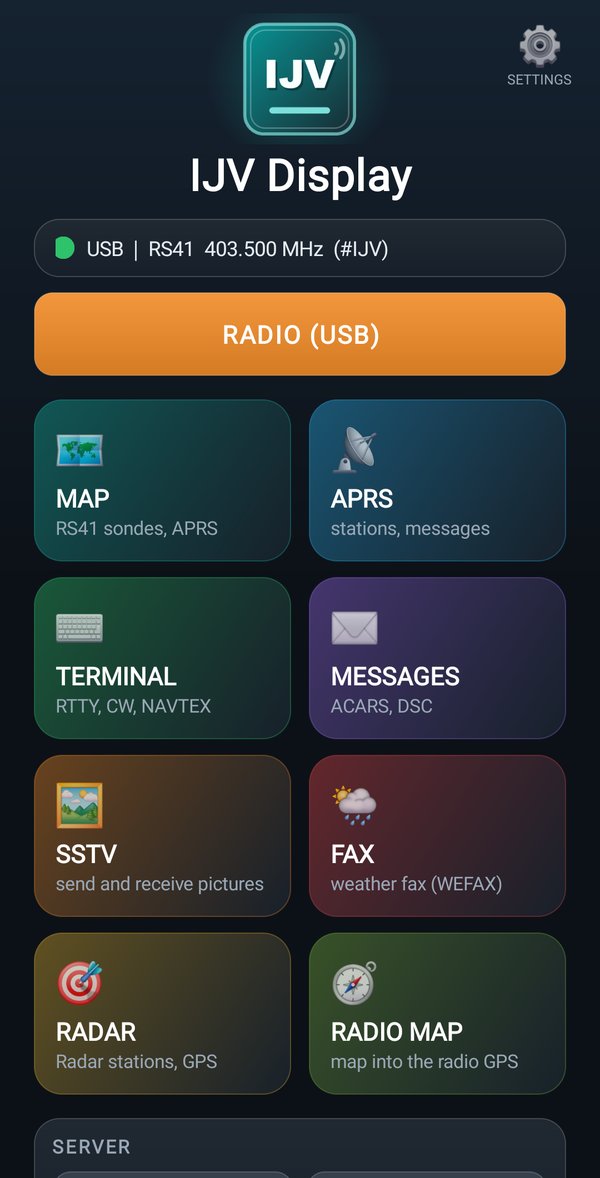
The home page
The radio status, the tiles, SERVER and SHARE
What the status line says, the view tiles, the row of tabs to go from one view to another, SERVER and SHARE.
Settings
Views, language, home position, coordinates to the radio, account
Which view opens by itself, the language, where your station is and how to write the phone's position into the radio.
MAP: the map
Sondes, APRS stations and ships on the map, and how to find them
Every button of the map, the boxes with the data, and how to go looking for a sonde on foot.
APRS: the stations
The list of APRS stations heard by the radio
Every station with its symbol, the position, the weather and the comment, the distance from you.
TERMINAL: the text
The text of the decoders: RTTY, CW, NAVTEX
The text of RTTY, CW and NAVTEX as it comes from the radio; stopping it, copying it, saving it.
MESSAGES: the messages
ACARS from planes, DSC from ships, APRS messages
Messages from planes (ACARS) and from ships (DSC), distress calls in red, APRS messages.
SSTV: the pictures
Receiving pictures, the gallery, sending a picture to the radio
The pictures the radio receives, the gallery on the phone, and how to send a picture to the radio so it can transmit it.
FAX: the weather fax
The fax that arrives line by line, and how to straighten it
The live weather fax, the gallery, and how to fix a crooked or dark fax.
RADAR: the stations around you
The stations of the Radar module on the map
You in the center, the stations around you with distance and direction, the group.
RADIO MAP: the map for the radio
The road map for the radio's GPS module (PRO)
You draw the area on the map, the server makes the map, the phone writes it into the radio.
APRS iGATE: the phone works as an iGate
APRS messages between nearby radios and the internet, even where nobody puts them back on the air
The radio connected to the phone takes the messages of nearby radios to the internet and puts the incoming ones back on the air: the replies from Telegram too.
If something goes wrong
Warnings, error messages and what to do
The radio that cannot be seen, the data that does not arrive, RadioManager that does not connect, and all the error messages.