RADAR: the stations around you
The stations of the Radar module on the map
What you see
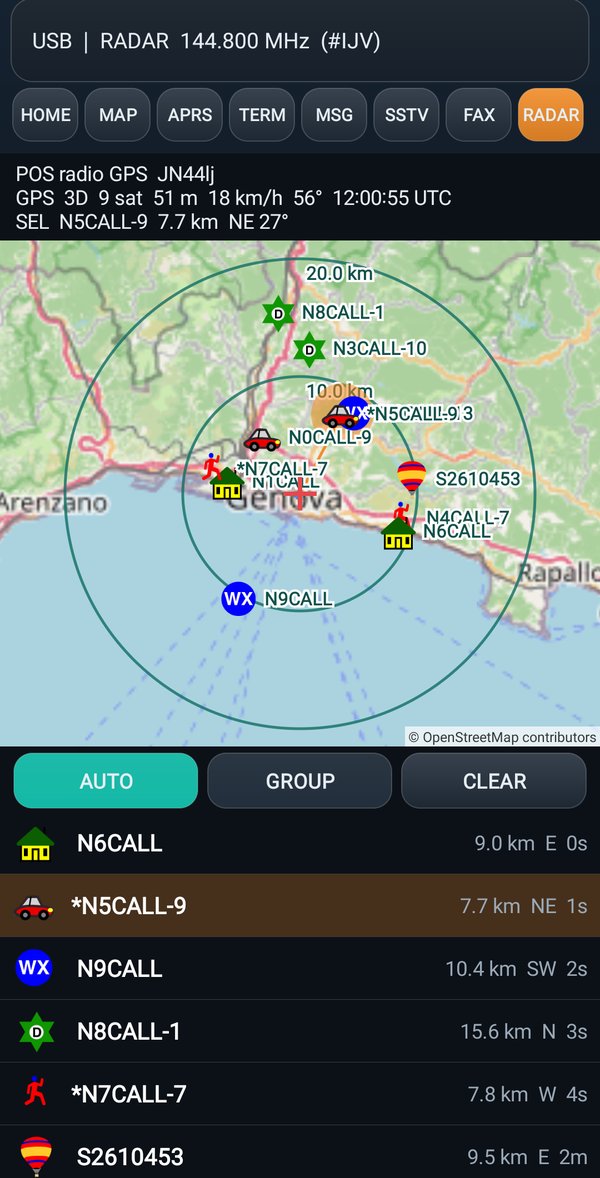
What the radio's Radar module sees, with the map underneath. You are in the center, with the cross; two circles give the distance; around you are the stations heard. The chosen station has the filled circle and the line; the * sign marks the stations of your group.
Below, the list of stations with distance, direction and how long since they were last heard; there is also your position with the track of the radio's GPS.
On the radio, in the Radar module: hold down MENU, SERIAL OUTPUT opens, press 2. Until something arrives, the app tells you what to do.
The buttons
| Button | What it does |
|---|---|
| AUTO | the map frames you and the circles by itself. If you tap a station in the list, the map goes there and AUTO turns off |
| GROUP | shows only the stations of the group |
| CLEAR | clears the list |
At the bottom the app says where your position comes from: POS radio GPS
, POS radio APRSPos
or POS phone
.